 Live Chat



.png)






Written by: Joblogic
Stop service credits before they start: Live SLA dashboards and AI alerts
Internal reporting for a major NHS estates and maintenance team showed that only 60% of reactive maintenance requests were completed within their target response time. This is not a small contractor working from spreadsheets. It is a government-backed organisation with a centralised FM platform, a dedicated estates team, and mature processes already in place.
When an operation as big as the NHS is only hitting SLAs on just over half of its reactive work, it shows what the rest of the industry is up against. Most FM and service providers are being asked to deliver the same or better service levels with fewer engineers, tighter budgets, and less control across multi-site operations. The instinctive response is to try to hire your way out of the problem, but the UK is already short 46,000 engineers, with around 145 open roles for every new apprentice. Even if the budget existed, you cannot recruit your way to better SLA performance.
In that environment, SLA breaches are hard to avoid. They usually come from everyday friction that often goes unnoticed, for example:
- An engineer is delayed between sites
- A subcontractor accepts a job but does not update the status
- A reactive call waits on access, parts, or approval, and quietly runs out of SLA
Individually, these feel like minor bumps. By month end they show up as failed response and fix times, and a stack of service credits and SLA penalties that erode margin and relationships. Without a live view of work and subcontractors, you are guessing, not managing, so you need a real time SLA dashboard for field service with data-backed oversight and AI alerts for SLA monitoring that surface the work most likely to breach.
In this article we will look at what actually drives SLA breaches in multi-site portfolios, how live status and engineer tracking helps you reprioritise work, where AI assisted exception views add value, and a simple daily routine to help you prevent SLA breaches and keep service credits off the table.
Service levels, KPIs, and service credits: what actually matters
By the time the monthly report lands, your world has been boiled down to a small set of lines on a page. In most FM contracts, that boils down to four questions:
- Did you hit agreed response times?
- Did you hit agreed fix times?
- Did you keep PPM and statutory work compliant?
- Did you keep complaints and callbacks under control?
On the contract, these sit under headings like service levels and KPIs. A service level is the promise itself, for example “attend emergencies within 4 hours” or “complete high priority jobs within 24 hours.” The KPI is how often you keep that promise, such as “95% of emergencies attended within 4 hours.” When you miss those targets often enough, you move into service credits and SLA penalties. At that point it is not just a red line on a chart. It is a deduction from your invoice, pressure on your margin, and a question mark over whether the contract is under control.
Guidance from professional bodies and independent FM consultancies is consistent on this point: a small set of clearly defined service levels, meaningful KPIs, and carefully chosen service credits is far more effective than a long list of measures that nobody can realistically manage.
If you lead service delivery, this is what your performance is based on. Your client doesn’t see the hours of stress and hard work it took to staff the rota or chase subcontractors. They see whether you stayed inside those few critical service levels. Those are the numbers that sit in the contract, and they are the exact numbers that should sit on your SLA dashboard for field service. If a KPI is important enough to trigger service credits, it is important enough to be visible in real time across engineers, sites, and subcontractors, not hidden in a month end PDF.
Success is not arguing about service credits at month end. It is keeping the KPIs that trigger them under control before they cross the line.
The real reasons you breach SLAs on multi-site contracts
Lack of effort is not what causes missed SLAs. When your company’s reputation is at stake, employees care. SLAs are missed because teams are trying to run complex, multi-site portfolios, with poor visibility of jobs, engineers, and subcontractors.
The problems usually look like this:
- Late or failed attendance: Engineers are delayed between sites, routes are not adjusted in real time, or the rota is overloaded. The job is accepted, but no one reaches site before the SLA clock runs out.
- Wrong engineer, wrong skill: Jobs are sent to the wrong trade or level of competency. The engineer attends, cannot complete, and a follow-up visit is needed, so the fix time target is gone before the right person even arrives.
- Jobs stuck on hold: Tickets sit waiting on access, permits, parts, quotes, or client approval. Nobody owns moving them on, they quietly age in the background, and they slide out of SLA without anyone noticing.
- Subcontractor gaps and delays: Subcontractors accept jobs but do not update status, work outside your system, or return completion evidence late. On your side the job still looks open or unclear, and the SLA clock does not care whose logo is on the van.
- Everything marked as urgent: When half the board is P1 or P2, it is almost impossible to see which jobs are genuinely close to breaching. Engineers work on the loudest job, not the one with the least SLA time left.
- Work happening outside your system: Requests arrive by email, phone, or WhatsApp, and some jobs sit in supplier portals or spreadsheets. You only see the breach when someone builds the report.
These issues push response and fix times over their limits, cut into SLA compliance, and show up as service credits and SLA penalties. You cannot stop every delay, but you can avoid many SLA breaches by seeing these patterns early on a live view of jobs, engineers, and subcontractors. 
Using live status and engineer tracking to rescue at-risk jobs
Once you know why you are breaching SLAs, the next question is simple: which jobs can you still save today?
A real time SLA dashboard for field service should give you a single live view of your operation. At a glance you can see:
- Which jobs are closest to their response or fix time limit
- Which engineers are on site, en route, or about to finish
- Which subcontractor jobs have not been updated or look stalled
This is why serious estates and FM teams are moving to central FM software and live SLA dashboards that show attend and fix performance in real time, not just in a monthly pack.
With that live picture, a dispatcher or service manager can actually change the outcome:
- Pull a job that is about to breach to the top of the queue
- Reassign work from an overloaded engineer to someone who can get there sooner
- Switch from a slow subcontractor to an in house team, or escalate with clear facts
You cannot remove every delay, but with live status and engineer tracking you can choose which jobs to protect first, instead of finding out at month end which ones you lost.
AI assisted exception views and early warnings
Even with a live SLA dashboard, there is too much information on the screen for one person to track all day. This is where AI assisted exception views and AI alerts for SLA monitoring earn their keep.Instead of manually scanning every job, AI can watch the board in the background and surface the work that is most likely to cause tomorrow’s problems. Typical examples include:
- Jobs that are close to breaching response or fix time, based on live status and history
- Jobs on hold for longer than normal for parts, access, or approval
- Sites, assets, or trades that repeatedly appear in breach or near breach
- Subcontractors that are consistently late to attend or slow to update
AI is not there to replace the dispatcher or the service manager. It serves as a tool to cut the noise, detect patterns, and provide a clear list of priorities. Used correctly, AI alerts for SLA monitoring turn your field service SLA dashboard into a live early warning system that helps you stop breaches before they happen.
A simple daily SLA risk routine
Eliminate those afternoon-ruining surprises in the SLA report by gaining control during the day, not just insight at the end of it. You do not need a big new process, just a simple daily routine that keeps SLA risk in view. It is the same kind of short, regular performance check that mature estates and FM teams use to stay on top of service levels.
Morning: 10-15 minute SLA risk check
Service manager, dispatcher, and, if possible, a team lead.
- Open the SLA dashboard and review today’s work
- Identify jobs closest to breaching, jobs on hold, and subcontractor jobs with no recent update
- Agree 3-5 concrete actions: reassign, escalate, chase, or update the customer
Midday: 5 minute course correction
Dispatcher or coordinator.
- Reopen the dashboard and scan for new at-risk jobs since the morning
- Check that the morning actions have moved in the right direction
- Adjust the plan where needed so you protect SLAs before they breach
End of day: 10 minute review
Service manager or team lead.
- Look at any breaches and near misses on the dashboard
- Note the main causes: delay, wrong skill, access, parts, subcontractor, or data gaps
- Capture one simple improvement or follow-up for the next day
Run this routine consistently and the SLA report starts to confirm what you already know: which jobs were at risk, what you did about them, and why there are fewer service credits on the table.
Stop service credits before they start
When SLAs are under control, your whole operation feels different, not just the month end report. Three things change in the day to day.
Your day feels different
You are not waiting for bad news. The dispatcher starts from a live view of at-risk jobs, not yesterday’s inbox. Engineers see a plan that reacts to what is really happening on site, instead of last-minute reshuffles and fire drills.
Your numbers behave differently
Fewer jobs drift over their response or fix time limits. Compliance steadies instead of swinging from month to month. Service credits and SLA penalties stop feeling like a permanent line in the P&L and become the exception again. In teams that run from a live dashboard and clear exception views, it is common to see first-time fix improve by around 25% and workforce productivity rise by 40%, because work is going to the right person at the right time instead of being lost in the noise.
Your conversations sound different
Monthly reviews start to confirm what you already see on the dashboard. You can explain where the risk was, what you did about it, and where you still need help from the client or supply chain. The discussion moves away from blame and credits, and toward planning and improvement.
In the end, performance is about control and timing. A real time SLA dashboard for field service, supported by AI alerts for SLA monitoring and a simple daily risk routine, gives you early warning and clear priorities. Instead of treating service credits as a cost of doing business, you put yourself in a position to prevent many breaches before they ever reach the report.
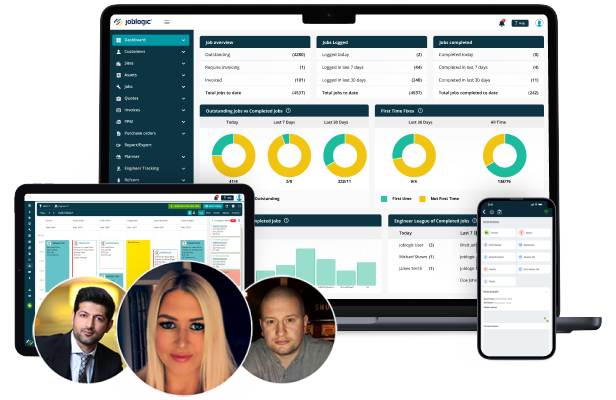
Book a demo today!
Speak to our product experts to see how the Joblogic features adapt to fit your business and workflows
*No hard sell, no commitment