









Written by: Joblogic
What is CAFM software? A UK guide for facilities teams
Computer-aided facility management (CAFM) software is a system that facilities teams use to run the maintenance and day-to-day operation of buildings. It keeps assets, planned and reactive jobs, compliance records, and space data in one place, so managers and engineers work from the same information.
In-house estates teams use a CAFM system to look after their own buildings. Invida, part of the Joblogic Group, is the CAFM platform built for them. Facilities management (FM) contractors and service providers use Joblogic to deliver planned and reactive work across client sites, against service level agreements (SLAs).
This guide explains what CAFM software, a type of facilities management software, does each day and how it compares with other maintenance systems. It also covers where SFG20 and UK statutory checks fit, then ends with a buying checklist and five rollout steps.
What CAFM stands for and what the software does
CAFM stands for computer-aided facility management. The ISO 41011 definition, cited by ISO's facility management committee, describes FM as an "organizational function which integrates people, place, and process within the built environment". A CAFM system gives that function a shared record of every building, asset, and job.
Without one, the information sits in different places. Asset details live in a spreadsheet, engineers fill in paper job sheets, and planned preventive maintenance (PPM) dates sit in someone's calendar. Then an auditor asks for six months of fire door inspection records, and a missed PPM visit turns up for the first time.
CAFM software brings those records together. Office staff schedule the work, and engineers see each job on their phones. Managers can check what's done and what's overdue without chasing anyone for an update.
Core features of a CAFM system
Most CAFM software shares the six core modules below.
Asset register and lifecycle tracking
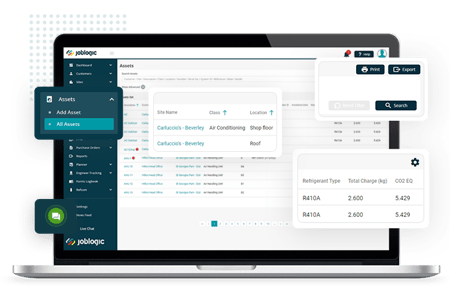
An engineer arrives at a rooftop chiller with no record of the last three visits. They lose the first hour working out what the previous engineer did.
CAFM software tracks each asset across its whole lifecycle, starting at procurement and ending at disposal. The CAFM system stores each asset's maintenance history, along with warranty details, depreciation, and replacement schedules.
QR (quick response) code tags link each physical asset to its record. The engineer scans the tag and reads the service history before opening the panel.
The same history shows repeat faults, so managers can plan replacement before the next breakdown. Joblogic's asset management software supports QR code tagging and bulk import of an existing register.
Planned preventive maintenance (PPM) scheduling
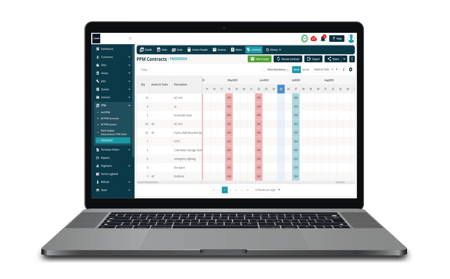
PPM is the planned work that keeps assets compliant and running, such as filter changes and emergency lighting tests. CAFM software builds each visit from a schedule, so the job appears in the planner on the right date. Office staff stop rebuilding the calendar by hand every month.
If your contracts specify SFG20, you can base PPM tasks and frequencies on its schedules. The SFG20 section below explains how the two fit together.
A missed visit shows as overdue in the planner, long before an audit finds it. Contract PPM also ties into billing. Joblogic's planned maintenance software lets you set the visit frequency for each site, create contract quotes, and use task-driven billing.
Reactive jobs and work orders
A tenant reports a leaking pipe on a Friday afternoon. The helpdesk logs the call in the CAFM system, which creates the job and starts the SLA clock.
Most CAFM software calls each job a work order. The software creates jobs automatically when maintenance falls due, based on predefined schedules or triggers. It then assigns each job to the right engineer.
Engineers get real-time updates on their phones, and the office sees each status change as it happens. Managers can spot jobs close to an SLA breach and move an engineer before the deadline passes.
Mobile app for engineers
Engineers spend much of their day in plant rooms and basements where the signal drops. Good CAFM software includes a mobile app that still works when that happens. The Joblogic app lets engineers view and update primary job data even where the signal is unreliable.
On site, the engineer takes photos and completes compliance checklists on the phone. The system generates and stores the certificate from the completed form, so the office can file it the same day. Joblogic's mobile engineer app sends job alerts and gives engineers asset and job records on site.
Space and occupancy management
Space modules show floor plans and let you analyse how each area is used. Occupancy sensors feed in live data, so you can see which floors sit empty on a Friday.
Scenario planning lets you test "what-if" options for renovations or relocations before anyone moves a desk.
Reporting and dashboards
CAFM software dashboards display key performance indicators (KPIs) such as maintenance costs, energy consumption, and space use. Charts, graphs, and heatmaps show where costs cluster by site or asset.
You can schedule automated reports to reach stakeholders each week or month, so nobody waits for a spreadsheet. For contractors, the same data answers the questions clients raise at contract review, such as SLA performance and spend per site. Joblogic's reporting and dashboards include pre-built and custom reports with easy-to-read graphs.
How SFG20 and UK statutory checks fit into CAFM
SFG20 was created by the Building Engineering Services Association (BESA) in 1990 and describes itself as the industry standard for building maintenance specification. SFG20 says it now holds over 1,500 schedules, with over 700 updates made annually.
SFG20 works alongside CAFM, computerised maintenance management systems (CMMS), and integrated workplace management systems (IWMS). SFG20 says it tells you "what work needs to happen" and integrates with those systems. Your CAFM system then schedules those tasks, sends them to engineers, and stores the evidence.
UK law also sets maintenance and record-keeping duties that CAFM software can schedule as recurring tasks. Guidance from the Health and Safety Executive (HSE) on lifting equipment says that, unless an examination scheme sets other intervals, thorough examinations are due every six months for lifting accessories and equipment that lifts people, and every 12 months for other lifting equipment.
For legionella, HSE says employers and those in control of premises must identify and assess the risk, manage and control it, and keep the right records. In England and Wales, Article 17 of the Regulatory Reform (Fire Safety) Order 2005 requires the responsible person to keep premises and fire safety equipment under "a suitable system of maintenance", as published on legislation.gov.uk.
Each duty becomes a task with a due date, an assigned engineer, and a stored record. When an inspector asks for proof, you pull the history from one system. For more depth, read about how CAFM supports compliance.
CAFM vs CMMS vs IWMS
The difference comes down to scope. CAFM software covers buildings, space, and their maintenance. A CMMS centres on equipment maintenance, while an IWMS extends to leases, capital projects, and sustainability across a corporate estate.
| System | Main focus | Typical users | Core scope | Where it fits |
|---|---|---|---|---|
| CAFM | Buildings, space, and the maintenance of them | Facilities managers, FM contractors | Assets, PPM, reactive jobs, space, compliance | Running and maintaining a building estate |
| CMMS | Maintenance of equipment | Maintenance managers, engineers | Work orders, asset maintenance, PPM, stock | Maintenance-heavy sites and equipment |
| IWMS | The whole real estate portfolio | Corporate real estate teams | CAFM scope plus leases, capital projects, sustainability | Large corporate estates |
FM contractors who look after buildings and the plant inside them need CAFM and CMMS features in the same system. Our full CAFM and CMMS comparison goes deeper on where the two overlap.
Who uses CAFM software
The Institute of Workplace and Facilities Management (IWFM) says the UK workplace and facilities industry generates around £108 billion in business turnover annually. It also describes a sector that provides work for 1.2 million people.
In-house estates and facilities managers use CAFM software to run their own buildings, such as a head office or a university campus. FM contractors deliver PPM and statutory work across many client sites. They track SLAs on every contract and pass overflow work to subcontractors through a portal.
The Parr FM case study shows the contractor side. Parr FM supports over 1,000 sites, processes more than 5,000 jobs a month, and keeps 98% SLA compliance. Its invoice preparation fell from about 15 minutes per job to about one minute.
GKR Facilities Services started with a small team of eight on a CAFM system that struggled to keep pace. Its case study reports a 500% workforce expansion, and you can read how GKR scaled.
Which Joblogic Group platform fits your team
The Joblogic Group runs two platforms. The right one depends on whether your team owns the buildings or delivers the maintenance work inside them.
The Invida CAFM platform is designed for the owners and operators of property portfolios. Each customer has its own instance, and you can bring service providers onto the platform on your terms.
Joblogic is built for FM contractors and service providers who deliver PPM and reactive work across client sites. Joblogic's Enterprise plan suits multi-site operations and adds advanced reports and dashboards, task and asset compliance, the customer portal, and stock management. It also includes group invoicing and schedule of rates.
What to look for in CAFM software
Use this checklist to compare systems against how your team works today.
-
Check for UK compliance support, including SFG20 schedules and statutory task tracking.
-
Run PPM and reactive jobs in the same planner, so every visit shows in one view.
-
Test the mobile app offline in a basement or plant room before you sign.
-
Ask for an asset register with QR code tagging and full service history.
-
Confirm the system tracks SLA response and fix times on every job.
-
Look for subcontractor management, such as a subcontractor portal for assigning jobs, tracking performance, and letting subcontractors update job information.
-
Check whether a customer portal lets clients log jobs and view their records.
-
Make sure reporting and accounts integration remove double entry between the office and finance.
If a vendor can't show one of these in a live demo, ask how their customers handle it today.
Steps to roll out a CAFM system
These five steps keep the switch manageable for the office and the field.
-
Audit your current processes and data, including spreadsheets, paper job sheets, and calendars.
-
Clean and import your site and asset registers, removing duplicates before go-live.
-
Set up PPM schedules and SLAs for each contract or building.
-
Train office staff and engineers, starting with the jobs they handle every day.
-
Review KPIs after go-live and adjust schedules where visits run late.
Start engineers on routine visits, so their first jobs in the app are familiar ones. Keep the old spreadsheets read-only for the first month, so nobody updates two records at once.
How to test a CAFM system before your next audit
The test for any CAFM system is the next audit or contract review you face. If you can pull a full asset history and every statutory record in minutes, the system is doing its job.
Score your current setup against the checklist above. The gaps show where missed visits and lost admin hours come from, and which features to test first in a demo. FM contractors should look hardest at SLA tracking and the subcontractor workflow, because multi-site contracts depend on both.
To see jobs, assets, PPM, and compliance records working together for your own sites, book a demo with our team.
FAQs
What does CAFM stand for?
CAFM stands for computer-aided facility management. It describes software that facilities teams use to manage buildings, assets, and the maintenance work around them. A CAFM system holds the asset register, PPM schedules, reactive jobs, and compliance records together. Office staff plan the work and engineers complete it on a mobile app, so everyone works from the same record.
What is the difference between CAFM and CMMS?
CAFM covers the building as a whole, including space, assets, PPM, reactive jobs, and compliance. A CMMS focuses on maintaining equipment, with jobs, asset maintenance, PPM, and stock control. FM contractors who look after buildings and the plant inside them need both sets of features. The comparison table above shows where each category fits.
Is SFG20 a CAFM system?
SFG20 is a maintenance specification library. SFG20 says it tells you "what work needs to happen" and integrates with your CAFM, CMMS or IWMS. Your CAFM system then plans those tasks, assigns them to engineers, and stores the completed records as evidence. If your contracts specify SFG20, check that any system you shortlist can work with its schedules.
How much does CAFM software cost?
Pricing depends on the vendor, the number of users, and the modules you need. Joblogic prices per user across three plans. Standard covers job management for urgent, reactive maintenance. Premium adds PPM contracts, route scheduling, and engineer tracking. Enterprise adds task and asset compliance, the customer portal, and advanced reports. See Joblogic's published pricing for current figures. Invida, the Group's CAFM platform for in-house teams, includes new reports, extra support, and ongoing configuration help in one monthly price.