 Live Chat



.png)





Written by: Admin
Integrating your HVAC software with QuickBooks, Xero, and Sage
Many HVAC companies already run their billing and accounting on QuickBooks, Xero, or Sage. Joblogic's HVAC software connects to all three, so job and invoice data moves from the engineer's phone to your accounts without being typed in twice.
This guide covers what syncs, how to connect QuickBooks, how the main accounting packages compare, and what HVAC businesses need from their software beyond the accounting link.
Why integrate HVAC software with your accounting package?
Joblogic is job management software for HVAC and field service businesses, and it works from desktops and mobiles. Connecting it to your accounting package means the back office and accounts work from the same customer and invoice records, so managers get accurate billing information when they need it. It also removes the manual input that causes errors, so your team spends less time tracking back to correct a mistyped figure.
Combine accounting and work order management
Joblogic covers the job side of HVAC work that an accounting package does not: scheduling engineers, tracking assets, recording refrigerant use, and managing maintenance contracts. QuickBooks stays your accounting system, and the integration passes the financial data across.
Joblogic gives you and your engineers access to job, asset, and customer data from any location. Engineers have job details, history, and forms on their mobile devices, so there are no notebooks in the office or handwritten notes to chase.
What syncs between Joblogic and QuickBooks?
Joblogic's QuickBooks integration syncs customers, tax and nominal codes, and invoices, credit notes, and payments. The direction depends on the data.
| Data | Direction | Good to know |
|---|---|---|
| Customers | Both ways | A customer syncs from Joblogic to QuickBooks once an approved invoice exists for them in Joblogic |
| Tax and nominal codes | QuickBooks to Joblogic | Sync these early so invoices carry the right codes |
| Sales invoices, credit notes, and payments | Joblogic to QuickBooks | Covers sales invoices only |
| Purchase and supplier invoices | Not part of the live sync | Export them with Joblogic's batch export tool or Report module |
How to connect Joblogic to QuickBooks
- In Joblogic, go to Settings and open Accounts Integration.
- Select Connect to QuickBooks, and authorise Joblogic inside QuickBooks.
- Return to the QuickBooks Sync area under Account integration.
- Choose what to sync. Joblogic's integration guides recommend starting with customers and tax and nominal codes on the first run.
- Click Save & Sync, check the items and record count in the pop-up, and click Proceed.
- Check the result. If a sync fails, merge any duplicate customers and check the tax codes on your invoices before you retry.
Joblogic's QuickBooks integration guide covers each step in more detail, and Joblogic Support can help on 0800 326 5561.
QuickBooks, Xero, and Sage compared
Joblogic's live sync works with several accounting packages. The table shows what each one syncs.
| Package | Customers | Sales invoices | Purchase invoices | Setup guide |
|---|---|---|---|---|
| QuickBooks | Both ways | Joblogic to QuickBooks, with credit notes and payments | Not in the live sync | QuickBooks guide |
| Xero | Both ways | Joblogic to Xero, with credit notes and payments | Not in the live sync | Xero guide |
| Sage 50 | Both ways | Joblogic to Sage 50, with credit notes and payments | Not in the live sync | Sage 50 guide |
| Sage Intacct | Sage Intacct to Joblogic, and Joblogic to Sage Intacct | Joblogic to Sage Intacct | Joblogic to Sage Intacct | Sage Intacct guide |
Joblogic's integrations page also lists Sage Accounting, Sage 200, KashFlow, FreeAgent, and AccountsIQ, which is available through the Joblogic Marketplace. If your package is not listed, you can export and import data with the batch export tool or Report module, or connect it through the Joblogic API. The accounts integration page has the full picture.
What HVAC businesses need beyond the accounting link
Joblogic's HVAC management software covers requirements that general field service tools can miss: refrigerant records, planned maintenance contracts, service level agreements, and subcontractors.
- F-Gas records: Joblogic's F-Gas tracking and reporting module, developed with REFCOM, manages gas cylinder stock, keeps the F-Gas logbook updated automatically, and records F-Gas transactions and leak checks from each service visit. Joblogic's Refcom back-office guide covers the setup.
- Planned maintenance: Joblogic's drag-and-drop planner schedules planned preventative maintenance visits down to the equipment task level, and recurring jobs can be set up as contracts. Planned maintenance is available on Premium and Enterprise.
- SLAs and contracts: Joblogic's Enterprise package adds advanced contract management and SLA tracking.
- Subcontractors: Joblogic's subcontractor portal lets you assign and track subcontractor jobs, with templates that control which job information you share with them. Joblogic's subcontractor management guide covers the wider process.
Joblogic customer TRS Cooling, an Oxfordshire HVAC and refrigeration specialist, chose it for this combination. Its Director, Tristan Spence, says: “The Refcom module was a major deciding factor in our move to Joblogic. We are now far more organised and proactive with our PPMs, have confidence in our asset tracking and F-Gas compliance and tracking.”
Simplify job scheduling
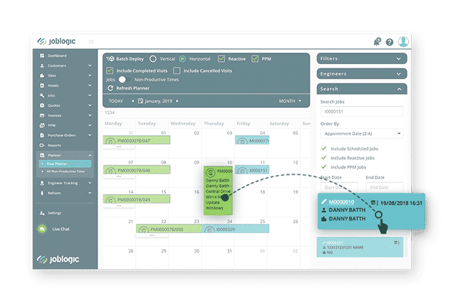
Joblogic lets you use your existing QuickBooks customer data to schedule jobs without re-keying it. It shows each engineer's weekly schedule at a glance, so you can pick an open gap for a new job. Its drag-and-drop planner lets you assign the job in a click, and you can see engineer availability before you book.
In Joblogic, a job is ready to assign the moment it is logged. You can group unallocated jobs by geographical area, priority, or customer, which helps HVAC businesses dispatch faster and keep field engineers busy.
Send work order information to field staff
With Joblogic, engineers no longer need to return to the office or ring in for job information. Your back office sends updated work details straight to the field through the mobile engineer app, which removes handwritten work orders that can contain mistakes or go missing. Engineers can update job progress, capture customer signatures, and take photos on site.
Joblogic creates the invoice from the job's work order information when the job is complete, and the invoice can then be approved and synced to QuickBooks. That keeps your billing accurate for every service completed. For more on billing, see Joblogic's HVAC invoicing software page.
What else Joblogic HVAC software covers
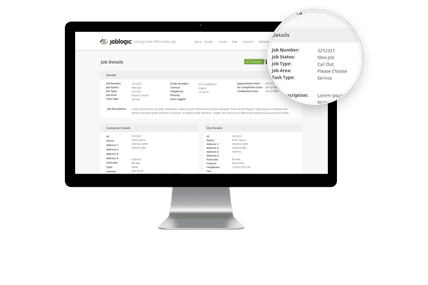
Joblogic's field service management software also lets you:
- Track engineers in the field and optimise their daily routes (Premium and Enterprise)
- Create invoices on job completion and sync them to your accounts package
- Receive job updates in the back office from field staff
- Track customer equipment in an asset register
- Schedule jobs as recurring contracts
- Update customers on job progress with customer alerts
- Assign jobs to engineers from the back office
- Monitor engineer timesheets (Premium and Enterprise)
- Manage stock with inventory control
- Track refrigerant gas use with the F-Gas module
To see how this works for your HVAC business, book a free demo with us today. A Joblogic specialist will walk you through the platform and how it connects to your accounts package.
Frequently asked questions
Does Joblogic integrate with QuickBooks?
Yes. Joblogic's QuickBooks integration syncs customers, tax and nominal codes, and sales invoices, credit notes, and payments. Customers sync both ways, and invoices, credit notes, and payments sync from Joblogic to QuickBooks.
Which accounting packages does Joblogic integrate with?
Joblogic integrates with QuickBooks, Xero, Sage Accounting, Sage 50, Sage 200, Sage Intacct, KashFlow, FreeAgent, and AccountsIQ. For other packages, you can export and import data with the batch export tool or Report module, or connect through the Joblogic API.
Can Joblogic sync purchase invoices to QuickBooks?
Not through the live sync. Joblogic's live sync for QuickBooks, Xero, and Sage 50 covers sales invoices only. Purchase invoices can be exported with the batch export tool or the Report module, and the Sage Intacct integration does include them.
What is the best HVAC service software for engineers?
Joblogic offers the main things HVAC engineers should look for: F-Gas records, planned maintenance and contract management, SLA tracking, subcontractor management, a mobile app, and an accounting integration that avoids double entry. Planned maintenance is on Premium and Enterprise, and SLA tracking and advanced contract management are on Enterprise. The right fit still depends on your work, so check each feature against your own contracts.
Is Joblogic suitable for HVAC and heating companies?
Joblogic's HVAC software covers job scheduling, planned maintenance, asset records, F-Gas tracking and reporting, and accounting integrations in one system. HVAC and refrigeration businesses such as TRS Cooling use it to manage compliance and planned maintenance.
Does Joblogic have F-Gas tracking?
Yes. Joblogic's F-Gas tracking and reporting module, developed with REFCOM, manages gas cylinder stock, updates the F-Gas logbook automatically, and records F-Gas transactions and leak checks from each service visit.